PHP – CRUD Islemler Serisi 2


Bir onceki PHP – CRUD Islemler Serisi 1 yazisinda Xampp icerisindeki PhpMyAdmin araci ile yeni bir veri tabani ve icerisine bir tablo olusturuyor olusturduk. Bu yazimizda ise index.php olusumunu ve ayni zamanda CRUD islemlerinden create komutunun kullanimi hakkinda bilgilendiriyor olucaz.
Php komutlarinizi en basit bir sekilde yazabilmek icin notepad++ arayuzunu kullanabilirsiniz. Bu arayuze https://notepad-plus-plus.org/download adresinden ulasabilirsiniz. Projemi c:\xampp\htdocs dizini altinda abc dizini olusturuyorum ve hemen icerisine proje dosyalarimi kaydetmeye basliyorum;Index.php komut satirlari ve ayni zamanda create islemi icin add_customer.php sayfasini asagidaki tasarlayabilirsiniz.

index.php
<html>
<head>
<title>: : Home : :</title>
</head>
<body>
<blockquote>
<h3>+ Home +</h3>
<p>
<a href="view_customer.php">+ view customer + </a><br/>
<a href="add_customer.php">+ add new customer + </a><br>
</p>
</blockquote>
<body>
</html>
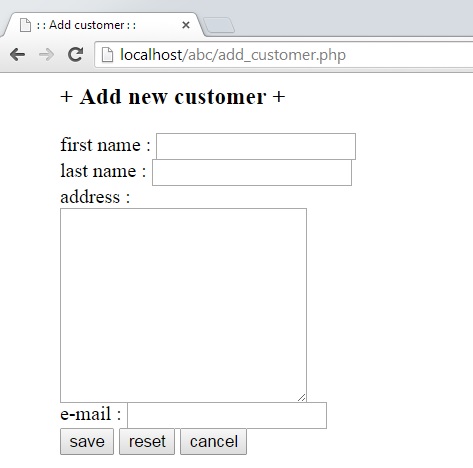
add_customer.php
<html>
<head>
<title>: : Add customer : :</title>
</head>
<body>
<form action="insert_customer.php" method="POST">
<blockquote>
<p>
<h3>+ Add new customer + <br/></h3>
first name : <input type="text" name="first_name"/><br/>
last name : <input type="text" name="last_name"/><br/>
address : <br/><textarea name="address" cols="25" rows="10"/></textarea><br/>
e-mail : <input type="text" name="email"/><br/>
<input type="submit" name="submit" value="save"/>
<input type="reset" name="reset" value="reset"/>
<input type="button" name="cancel" value="cancel" onclick="location.href='index.php'"/>
</p>
</blockquote>
</form>
<body>
</html>
insert_customer.php
<?php echo "you are on the insert_customer.php file <br/>"; $firstname = $_POST<'first_name'>
; $lastname = $_POST<'last_name'>
; $address = $_POST<'address'>
; $email = $_POST<'email'>
; //echo $firstname."<br/>"; //echo $lastname."<br/>"; //echo $address."<br/>"; //echo $email."<br/>"; mysql_connect("localhost","root","") or die ("Could not connect the server"); mysql_select_db("d_base") or die ("Could not connect the database"); echo "your have succesfully connected server and selected the database"; $sql = "insert into customer (firstname, lastname, address, email) values ('$firstname','$lastname','$address','$email')"; $query=mysql_query($sql); mysql_close(); header("Location:index.php"); ?> Goruldugu gibi veri tabanimiza hazirlamis oldugumuz arayuzlerden bilgileri insert sql cumlecigi ile kaydetmis oluyoruz. Sirada ki ilgili makale icin ; PHP – CRUD Islemler Serisi 3 : https://sevdanurgenc.com/archives/4235 Keyifli calismalar dilerim.


Comments